For a long while now, I’ve probably been using the Isla S2400 a bit differently than most people — not only as a studio tool, but as an instrument in a live setup where I need way more than 4 banks x 8 samples.
So instead of treating the machine in the classic way — one kick on one track, one snare on another, one hat on another, and so on — I’ve been leaning heavily on multisample mode in a more utilitarian way. I use multisample mode to place multiple variations of the same sample type inside a single sound. So for example I can have 8 kicks on track one, 8 snares on track two, 8 claps on track three, and so on — basically expanding each bank from 8 sounds to 64.
For me, this has turned the S2400 into something much more performance-oriented. Rather than committing a whole track to a single kick or snare, I can stay inside one lane and switch between different versions of the same sound family. That gives me much more variation for live sets without having to load new projects on the fly.
In practice, a track is no longer just “the kick track.” It becomes more like a curated kick bank where I can switch between regular kicks, knockier kicks, shorter kicks, rougher kicks, cleaner kicks, and use them instantly. Same with snares, claps, hi-hats, percussion, gunshots, cat meows, whatever.
So instead of thinking of it as 4 banks x 8 samples = 32 drum samples, I’ve been thinking of it more like 4 banks x 8 tracks x 8 samples = 256 different drum samples.
Once you start using the S2400 like this, you need a fast and repeatable way to build multisample files. If you are constantly creating banks of 8 kicks, 8 snares, 8 hats, and so on, sample preparation becomes a huge part of the workflow.
And doing that prep manually in a DAW gets tedious fast. It means normalizing levels, trimming starts, rejoining samples into one long file, adding fades, rendering the result, testing it, and redoing it again and again.
Why does that matter?
Because if I build one lane out of 8 kicks from 8 different sample packs, they are not always trimmed, normalized, or balanced properly. So when I switch sounds, it becomes obvious. One kick is weaker than the previous one, another is suddenly louder, another starts late, another clicks at the tail. That defeats the point of having a curated bank in the first place.
So proper prep matters. The samples do not need to sound identical, but they do need to sit in a comparable range. Gain staging matters. Trimming matters. Fade-ins and fade-outs matter. Controlled clipping or output treatment matters. Otherwise the bank becomes a pile of similar sounds that is still too sonically uneven to be truly coherent and playable.
That is exactly why I started making an app for it.
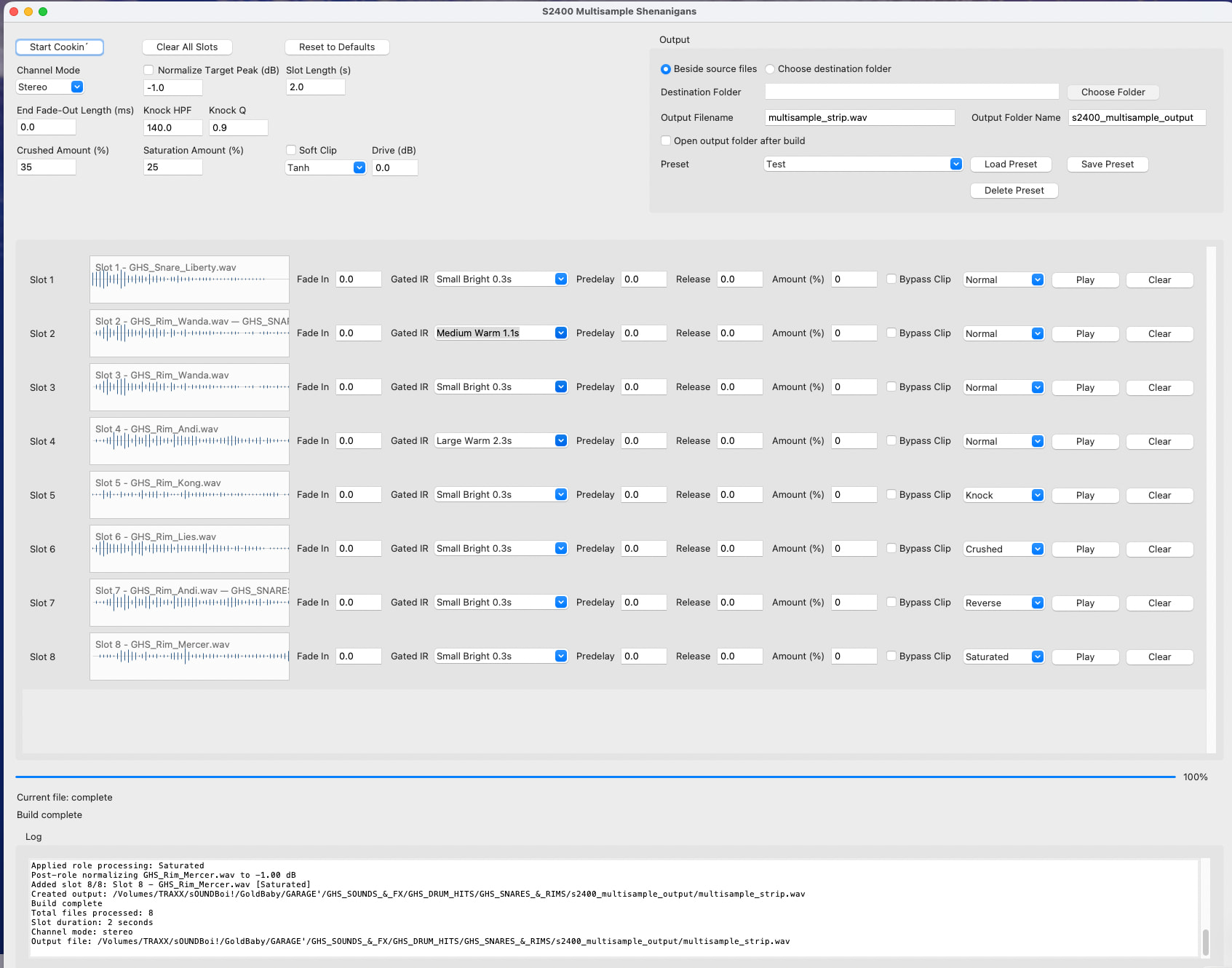
The app is meant to support this particular way of using the S2400. Instead of doing all the repetitive prep work manually, I wanted something that could build these multisample chains more automatically and consistently.
So what the app does is handle the technical prep between a folder of raw drum hits and a usable S2400 multisample file.
The basic idea is that I can take a group of samples — for example 8 kicks — and run them through a process that trims them, normalizes them, applies treatment if I want, adds fade-ins and fade-outs, places them into fixed slots, and renders them into one coherent multisample chain.
So the app is not just joining files. It is automating the boring but important work that I would otherwise have to do manually over and over again.
Very short app manual
The app is meant to take a group of raw one-shots and turn them into one usable multisample file for the S2400.
Basic use:
-
Drag in or select your samples
Usually I work with 8 related sounds at a time, for example 8 kicks or 8 snares. -
The app automatically trims the starts
So the samples begin properly and hit more consistently. -
Set the rest of the prep and any optional treatment
The app can normalize levels, add short fade-ins and fade-outs, place the sounds into fixed slots, and apply optional processing. -
Global and individual sound treatment consists of pitch up/down in cents, dirty time-stretching, Midiverb II IRs for exaggerated gated reverbs or just some ambience, bitcrushing, knock (high-pass), reverse, mild saturation, and a global soft-clipping effect to simulate a clip-to-master workflow.
-
Render the multisample
The app joins the processed samples into one coherent, evenly spaced multisample file ready for the S2400. -
Load the result into the S2400
Put the track in multisample mode, load the file, and that track now becomes a bank of related sounds instead of just one sound.
Where the app is at right now
Right now I’m building it in Python with Codex, very much in an amateur “vibe coding” kind of way, using regular FFmpeg libraries under the hood.
The core functionality is there, but I still need to test it properly, make some adjustments, and tighten things up.
After that, I’ll try to wrap it up in a way that makes it shareable instead of just being something I use locally, and hopefully I’ll be able to post it here in a few days.
Longer term, I can also imagine this becoming web-based. But first things first: get the Python/FFmpeg version working properly, test it in real use, and make sure the foundation is solid.
So the app is becoming both a multisample builder and a way to shape the character of the drum material before it gets packed into the S2400.
Update will follow..